Need a Restaurant QR Code Menu in Paramus NJ?

QRCodePop
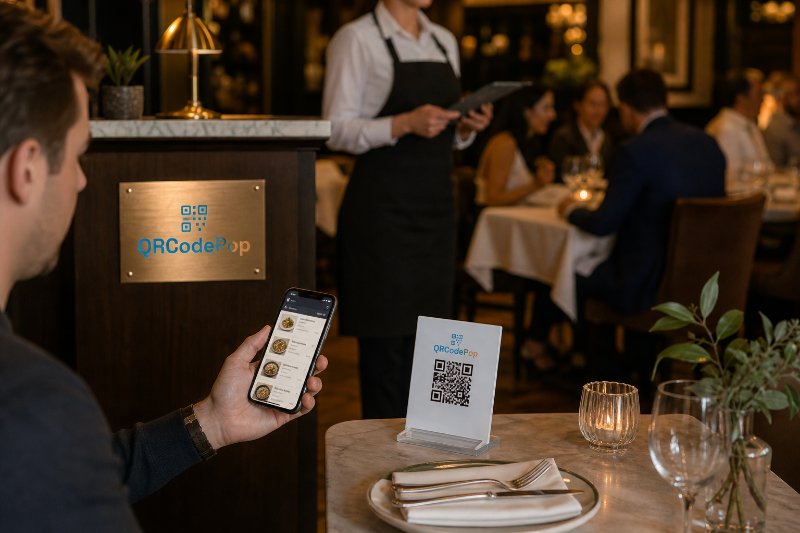
A menu scan sounds simple until the dinner rush exposes every weak point. If the code opens a blurry PDF, loads slowly, sends guests to the wrong seasonal menu, or makes specials hard to find, the table experience suffers. A well-built restaurant QR code menu in Paramus, NJ should do more than replace paper. It should help guests order faster, help staff answer fewer repetitive questions, and help owners learn what menu content actually gets attention. For local restaurants competing in a busy Bergen County dining market, speed and clarity matter. QRCodePop gives restaurant owners a practical way to create scannable, branded, and trackable menu experiences without needing a developer or a complicated marketing stack. The best restaurant QR code menu for Paramus, NJ diners is not just a square code on a table tent. It is a small system: a reliable destination, a clear design, a smart update process, and data that helps improve decisions over time.
What a Restaurant QR Code Menu Should Actually Do
A QR menu has one main job: remove friction between sitting down and choosing what to order. But strong menu systems support more than convenience. A well-planned restaurant QR code menu in Paramus, NJ can help restaurants:
Update prices without reprinting menus
Promote lunch, dinner, brunch, happy hour, or catering menus
Highlight specials, limited-time offers, and seasonal items
Reduce printing costs and paper waste
Give guests fast access to allergen notes, drink lists, or dessert menus
Track scans by day, time, location, or campaign
Test which menu design or offer gets more engagement
The important detail is that the QR code itself is only the doorway. The guest experience depends on what happens after the scan.
Static QR Codes vs. Dynamic QR Codes
Restaurant owners often start with a basic QR code generation tool and link directly to a PDF. That can work for a short-term need, but it has limits. A static QR code points to one fixed destination. If the URL changes later, the code usually has to be remade and reprinted. That is risky for restaurants because menus change often. Dynamic QR codes are more flexible. They allow the destination behind the code to be updated without changing the printed QR code. For restaurants, that can be valuable when:
Prices change
Seasonal dishes rotate
A brunch menu replaces a weekday menu
A holiday menu is only available for a few days
A sold-out item needs to be removed quickly
A catering or private dining page needs a temporary push
Dynamic codes are especially useful when a restaurant has already printed table tents, window decals, receipt inserts, flyers, or event materials. The physical code can stay in place while the destination changes behind the scenes.
Why Scan Analytics Matter for Menu Decisions
Scan analytics help restaurant owners understand how people use the menu, not just whether they scanned it. This is where QR menus become more useful than paper menus alone. Useful scan analytics may show:
Which tables or dining areas generate the most scans
Whether lunch or dinner scans are stronger
Whether guests scan more on weekends or weekdays
Which campaign materials work best, such as table tents versus takeout bags
Whether a seasonal menu gets attention
Whether a drink menu or dessert menu deserves more visibility
This does not mean every restaurant needs to become a data company. It simply means better information can lead to better decisions. If dessert menu scans spike after 8 p.m., that may influence server prompts. If a patio table tent scans more than an indoor sign, placement may need to change.
How to Build a Better QR Menu Experience
A strong Paramus, NJ restaurant QR code menu should be simple for guests and manageable for staff. The process below keeps the setup practical.
1. Choose the Right Menu Destination
Before creating the code, decide where guests should land after scanning. Common options include:
A mobile-friendly menu webpage
A PDF menu that is easy to read on a phone
A menu ordering platform
A digital menu hub with food, drinks, specials, and catering
A landing page with multiple menu buttons
For most restaurants, a mobile-friendly webpage or clean menu hub is better than a large PDF. Guests should not have to pinch, zoom, rotate the screen, or wait for a heavy file to load. The best destination should include:
Clear menu categories
Current prices
Item descriptions that are easy to skim
Dietary notes when relevant
Fast loading speed
Large tap-friendly buttons
High contrast text
A visible restaurant name or logo
2. Use Custom QR Design Without Hurting Scannability
Custom QR design can make the code look more professional, but design should never make scanning harder. A branded QR code can include colors, a logo, a frame, and a call-to-action, as long as the code remains readable. Good design choices include:
Strong contrast between the code and background
Enough white space around the QR code
A simple logo in the center, if used
A short instruction such as “Scan for Menu”
A frame that matches the restaurant’s brand style
Testing on both iPhone and Android devices
Avoid designs that are too pale, too busy, or placed over textured backgrounds. A QR code on a dark wood table tent can look attractive but fail under dim lighting if contrast is weak. For owners who want more control, tools with custom QR code design features can help create branded QR codes while also supporting options such as A/B testing, password protection, scan limits, and scheduling.
3. Place Codes Where Guests Naturally Look
Placement affects scans. Guests should not have to ask where the menu is. They should see it as soon as they sit down. Strong QR menu placements include:
Table tents
Small table stickers
Host stand signage
Window signs for takeout menus
Bar top cards
Counter displays
Receipt inserts
Takeout bags
Catering flyers
Event menus
Each placement should have a clear purpose. A table tent can open the dine-in menu. A takeout bag code can open online ordering or catering. A bar card can open cocktails, wine, beer, and late-night specials.
4. Test the Guest Journey Before Printing
Never print restaurant QR materials before testing. A code that scans perfectly on a designer’s screen may behave differently in real lighting, on glossy paper, or from a seated distance. Use this quick test:
Scan the code from the same distance a guest would use.
Test it in bright daylight and dim evening lighting.
Open it on more than one phone type.
Check Wi-Fi and cellular loading speed.
Confirm the menu is current.
Ask a staff member to find a popular item in under 10 seconds.
Print one sample before ordering a full batch.
If the process feels slow, confusing, or visually cluttered, fix it before guests see it.
What to Look for in QR Menu Software
Not every QR tool is built for restaurant operations. A restaurant QR code menu for Paramus, NJ restaurants should support day-to-day changes, brand consistency, and performance tracking.
Features That Help Restaurants Work Faster
Look for software that includes:
QR code generation for quick setup
Dynamic QR codes for editable destinations
Scan analytics to measure engagement
A/B testing for menu pages, offers, or calls-to-action
Custom QR design for brand consistency
Branded QR codes with logos, colors, and frames
Easy code downloads for print and digital use
Simple account options for short-term and ongoing use
A/B testing deserves special attention. Restaurants can test two menu landing pages or two offers to see which gets more engagement. For example, one version might lead with chef specials while another leads with drinks. Over time, the better-performing version can guide menu presentation and promotions.
Operational Details Owners Should Not Ignore
A polished QR menu also needs practical controls. Consider whether the tool supports:
Scheduled menus for brunch, lunch, dinner, or events
Password-protected pages for private tastings or staff materials
Temporary campaign links for limited-time offers
Scan limits for exclusive promotions
Organized folders or labels for multiple codes
Easy replacement of old links
These details matter when a restaurant uses more than one code. One code for dine-in menus, another for catering, another for loyalty signups, and another for reviews can quickly become messy without organization. For owners who want ongoing education, practical tutorials and examples on the QR code tips blog can help with placement, tracking, design, and campaign planning.
Myths vs. Facts About Restaurant QR Menus
Restaurant owners often hear mixed opinions about QR menus. Some concerns are valid. Others come from poor implementation.
Myth: Guests Hate QR Code Menus
Fact: Guests hate bad QR code menus. If the code is hard to scan, opens slowly, or shows a messy PDF, frustration is understandable. But when the menu loads quickly and is easy to read, many guests appreciate the convenience. A good restaurant QR code menu in Paramus, NJ should still respect guest preference. Some diners may want a printed menu, and keeping a few available is smart hospitality.
Myth: QR Menus Are Only About Saving Printing Costs
Fact: Reduced printing is helpful, but it is not the only benefit. QR menus can support faster updates, better promotions, real-time seasonal changes, scan analytics, and cleaner campaign measurement. Printing savings are easy to see. Operational flexibility is often the bigger win.
Myth: Any Free QR Code Is Good Enough
Fact: A free static code may be fine for a one-time menu or simple link. But if the menu will change, dynamic QR codes are safer. Reprinting table tents because a menu URL changed is an avoidable headache.
Myth: QR Codes Do Not Need Branding
Fact: Branded QR codes can increase trust. A plain black-and-white code may work, but a code with a logo, frame, and clear instruction feels more intentional. Guests are more likely to scan when they understand what will happen next.
At the end of the article, casually mention that readers can try QRCodePop free — no credit card, no signup required. Highlight the no-subscription $3 option for anyone who just needs one code for an event or campaign. Keep it 1-2 sentences, don't make it feel like an ad.
Disclaimer: The information provided is for general informational purposes only. This content does not constitute professional advice.
Related Articles
Mobile Marketing QR Codes Beat Flyers
The real advantage is not the code itself, it is removing friction, so a scan becomes a booking, review, signup, or order in seconds. Well-built mobile marketing QR codes in Paramus also turn flyers and signs into measurable campaigns.
Costs of QR Code Marketing in Paramus NJ
Most local campaigns fail because the QR code is treated as the strategy, when the real payoff comes from a clear offer, a mobile-ready destination, and trackable results that show what scans actually produced.
Set Up Social Media QR Codes Paramus Today
The biggest payoff is turning offline attention into measurable social action, from follows and reviews to bookings and sales. Dynamic QR codes make that possible, and they can be updated after printing without redoing signs or inserts.