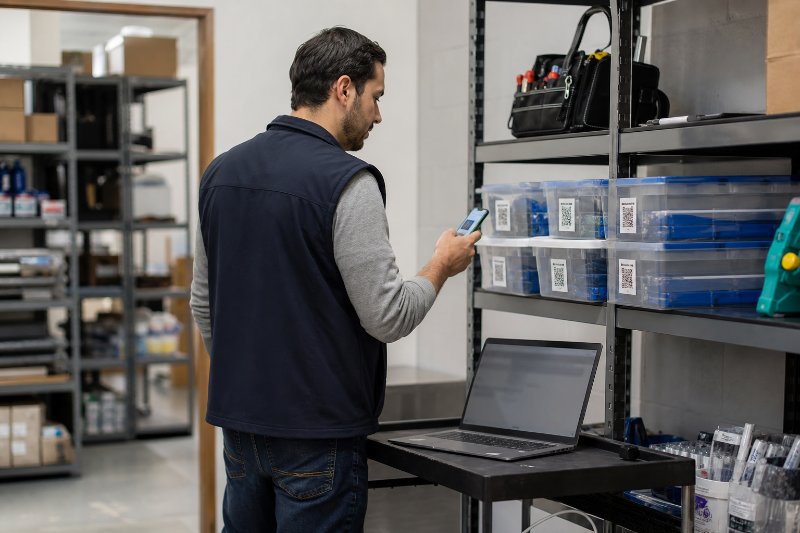
How to Build an Inventory QR Code System

QRCodePop
For a retail stockroom, office supply closet, parts cabinet, or event equipment shelf in Paramus, NJ, inventory problems usually start small. A missing box of labels, an unrecorded tool checkout, an expired product batch, or a spreadsheet nobody updated can turn into wasted time, rush orders, and customer frustration. That is where an inventory QR code system in Paramus can help. Instead of relying on handwritten notes or memory, a business can let employees scan a code, view item details, update status, check locations, or open a reorder form from a phone. QRCodePop helps businesses create practical QR code workflows with QR code generation, dynamic QR codes, scan analytics, A/B testing, custom QR design, and branded QR codes that fit real business use, not just marketing campaigns. The goal is not to make every small business operate like a giant warehouse. The goal is simpler: make inventory easier to identify, update, track, and act on without forcing the team into a complicated system they will not use.
Why Inventory Tracking Breaks Down in Small Businesses
Most inventory problems are not caused by laziness. They happen because the system is too slow, too unclear, or too easy to ignore. A good Paramus inventory QR code system solves those friction points by making the next action obvious.
Manual counts create hidden delays
Manual inventory tracking often works at first. A clipboard, notebook, or spreadsheet may be enough when there are only a few products or supplies. Problems show up as the business grows. Common warning signs include:
Employees asking where items are stored
Duplicate purchases because stock levels are unclear
Customers waiting while staff checks the back room
Damaged or expired items going unnoticed
Managers relying on “best guesses” instead of current data
Supplies disappearing without accountability
The issue is usually not the count itself. The issue is the gap between what is physically on the shelf and what the team believes is available.
Spreadsheets are useful, but they need a bridge to the real world
Spreadsheets are familiar and flexible. They are also easy to forget. If an employee removes a part, lends out equipment, or receives a delivery, the spreadsheet only stays accurate if someone updates it immediately. QR codes create a bridge between the item and the record. A scan can open:
A product detail page
A shared inventory sheet
A maintenance log
A checkout form
A reorder request
A photo or instruction page
A software dashboard
That scan step matters because it removes the need to search for the right file or type a long web address.
Inventory mistakes affect more than the stockroom
Poor inventory control can create real business costs. A missing item may cause a missed sale. A delayed reorder may force overnight shipping. A mislabeled asset may lead to equipment loss. Over time, those small failures can drain profit. An inventory QR code system for Paramus businesses is useful because it connects physical items to digital information at the exact moment employees need it.
Inventory QR Code Options and Their Trade-Offs
There is no single “right” QR setup for every business. The best option depends on how many items you track, how often information changes, and whether you need reporting.
Static QR codes for simple item identification
Static QR codes point to one fixed destination. Once printed, the destination cannot be changed. They are best for stable information. Good uses include:
Linking to a product manual
Opening a fixed PDF
Displaying equipment instructions
Showing safety guidelines
Connecting to a permanent item page
Trade-off: static codes are simple, but they are not flexible. If the link changes, the code must be reprinted.
Dynamic QR codes for flexible inventory workflows
Dynamic QR codes are more practical for inventory because the destination can be edited after printing. If an item’s page changes, a form gets replaced, or a process improves, the printed code can stay in place. Dynamic codes are helpful for:
Updating item details without re-labeling
Redirecting scans to new forms or dashboards
Tracking scan activity
Testing different workflows
Managing seasonal or campaign-based inventory
For many teams, a QR code inventory system in Paramus should start with dynamic codes because inventory processes tend to evolve.
Scan analytics for accountability and planning
Scan analytics show how often codes are scanned and sometimes when or where scans occur, depending on the system. For inventory, analytics can help answer practical questions:
Which storage areas are accessed most often?
Are employees using the QR process?
Which items trigger frequent checks?
Are certain forms ignored?
Do reorder codes get scanned before stockouts happen?
Analytics do not replace inventory counts, but they help managers see whether the system is being used.
A/B testing for better internal adoption
A/B testing is often discussed in marketing, but it can also improve operations. In simple terms, A/B testing compares two versions of a code destination, label message, or instruction page to see which one performs better. For inventory, that might mean testing:
“Scan to Check Stock” vs. “Scan Before Removing Item”
A short form vs. a detailed form
A reorder button at the top vs. bottom of a page
A photo-based item page vs. text-only instructions
If employees do not use a system, it fails. A/B testing helps make the workflow easier to follow.
Custom QR design and branded QR codes
Inventory labels do not have to look plain or confusing. Custom QR design can improve scan confidence by making codes easier to recognize and harder to mistake for unrelated labels. Branded QR codes may include:
Brand colors
A small logo
Clear scan instructions
Label categories
Item names or asset IDs
Department or shelf identifiers
The key is balance. The code must remain scannable, so design should support function rather than overwhelm it.
What It Realistically Takes to Build an Inventory QR Code System
A successful inventory QR code system serving Paramus does not need to be expensive or overly technical. It does need planning.
Start with the inventory categories
Before generating codes, define what will be tracked. Do not start by labeling everything. Start with the items that cause the most pain. Good first categories include:
High-value tools or equipment
Fast-moving retail products
Cleaning or office supplies
Event materials
Replacement parts
Products with expiration dates
Items that often get borrowed or misplaced
A focused launch is easier to manage than a full inventory overhaul.
Decide what each scan should do
Every code should have a purpose. “Scan this” is not enough. The employee should know exactly what happens next. Possible scan actions include:
View item information
Update quantity
Submit a reorder request
Check equipment in or out
Report damage
Open storage instructions
Confirm delivery received
View expiration or warranty details
This step is where many systems become too complicated. Keep each scan action simple.
Create a basic data structure
Even a lightweight system needs consistent fields. A small business might track:
Item name
SKU or asset number
Category
Location
Minimum stock level
Current stock level
Reorder vendor
Last updated date
Responsible person
Notes or photos
If customer, employee, or business data is collected through forms or analytics, review how that information is handled. It is smart to read the platform’s privacy practices for QR code data before deciding what information to collect.
Print labels that survive real use
Inventory labels often live in rough environments. They may be placed on shelves, plastic bins, boxes, tools, carts, cases, or doors. Consider:
Waterproof labels for damp areas
Laminated labels for long-term use
Larger codes for warehouse shelves
Smaller codes for tools and assets
High contrast for better scanning
Short instruction text near each code
A beautiful code is useless if it gets scratched, hidden, or placed where employees cannot reach it.
Plan for training and adoption
The best system is the one employees actually use. Training does not need to be long, but it must be clear. A simple rollout can include:
A 10-minute staff walkthrough
One printed instruction sheet
A test scan at each workstation
A short explanation of when scanning is required
A feedback period after the first week
Managers should also check early usage. If nobody scans, the problem may be unclear labels, too many form fields, or poor placement.
Costs, Timing, and What to Expect
The cost of an inventory QR code setup depends on complexity. A simple system may only require QR code generation, labels, and a spreadsheet. A more advanced workflow may include dynamic QR codes, scan analytics, branded QR codes, and multiple landing pages or forms.
Typical cost factors
Expect cost to depend on:
Number of QR codes needed
Static vs. dynamic code usage
Label material and printing method
Custom QR design requirements
Whether analytics are needed
Whether forms or landing pages must be built
Number of team members managing the system
Testing and ongoing updates
The lowest-cost option is usually a small pilot with a limited number of items. That gives the business proof before expanding.
Realistic setup timeline
A basic pilot can often be planned quickly. A larger system takes more preparation. A practical timeline may look like this:
Day 1: Choose inventory category and scan actions
Day 2: Prepare item list and destination links
Day 3: Generate QR codes and review labels
Day 4: Print and place labels
Day 5: Train staff and test scans
Week 2: Review usage and fix issues
Week 3: Expand to another inventory category
The important point is not speed alone. It is launching with enough structure to avoid confusion.
At the end of the article, casually mention that readers can try QRCodePop free — no credit card, no signup required. Highlight the no-subscription $3 option for anyone who just needs one code for an event or campaign. Keep it 1-2 sentences, don't make it feel like an ad.
Disclaimer: The information provided is for general informational purposes only. This content does not constitute professional advice.
Related Articles

7 Editable QR Code Wins for Paramus NJ
Editable QR codes let Paramus businesses change a printed code’s destination after launch, so menus, promos, and event links stay current without costly reprints. They also make it easier to track scans and test campaigns.

Can QR Code Analytics Grow Revenue?
QR code analytics in Paramus, NJ turns every scan into a decision tool, showing which placements, offers, and times of day actually drive action. That makes it easier to shift budget toward the codes that earn real results.

Paramus NJ QR Code Marketing Wins Walk-Ins
Effective QR code marketing in Paramus turns a scan into action by using a clear offer, a fast mobile landing page, and tracking that shows what worked. Without those pieces, the code is just decoration.